Getting Started
What is RADRobo?
RADRobo Overview
RADRobo is a cross platform GUI for working with engineering data in any format. Specialized support is provided for scalar data, waveform time series data, and packet data.
RADRobo is a light weight application and uses a plug-in concept to support any significant functionality like capturing or loading data.
An example plug-in is the WaveSPS software which captures waveform data from a Picoscope. Currently it analyzes 10BaseT1s waveform captures and produces packets and annotated wave forms.
Please watch the videos to get started after installing: Videos
"Installing" RADRobo
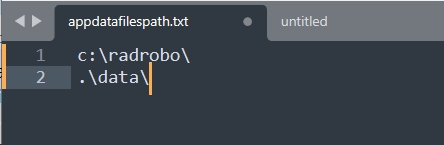
RADRobo is what is called a USB app. It does not require an installer. Everything needed to use RADRobo is contained in the application binary directory. There is one configuration file called "appdatafilespath.txt". This file contains one relevant line, an absolute or relative path to RADRobo's user files. This includes where the data is stored by default as well as templates for plug ins, backups, other settings.
The path can be absolute or relative. If the first two characters are .\ or (./) it is considered a relative folder to the app binary. Otherwise its a normal absolute path. Only the first line in the file is used.
Working with RADRobo
Working with RADRobo involves interacting with a data source and setting up a panel of GUI controls to interact with that data. RADRobo will automatically save your setup to AppDefaults.xml in your user data folder.
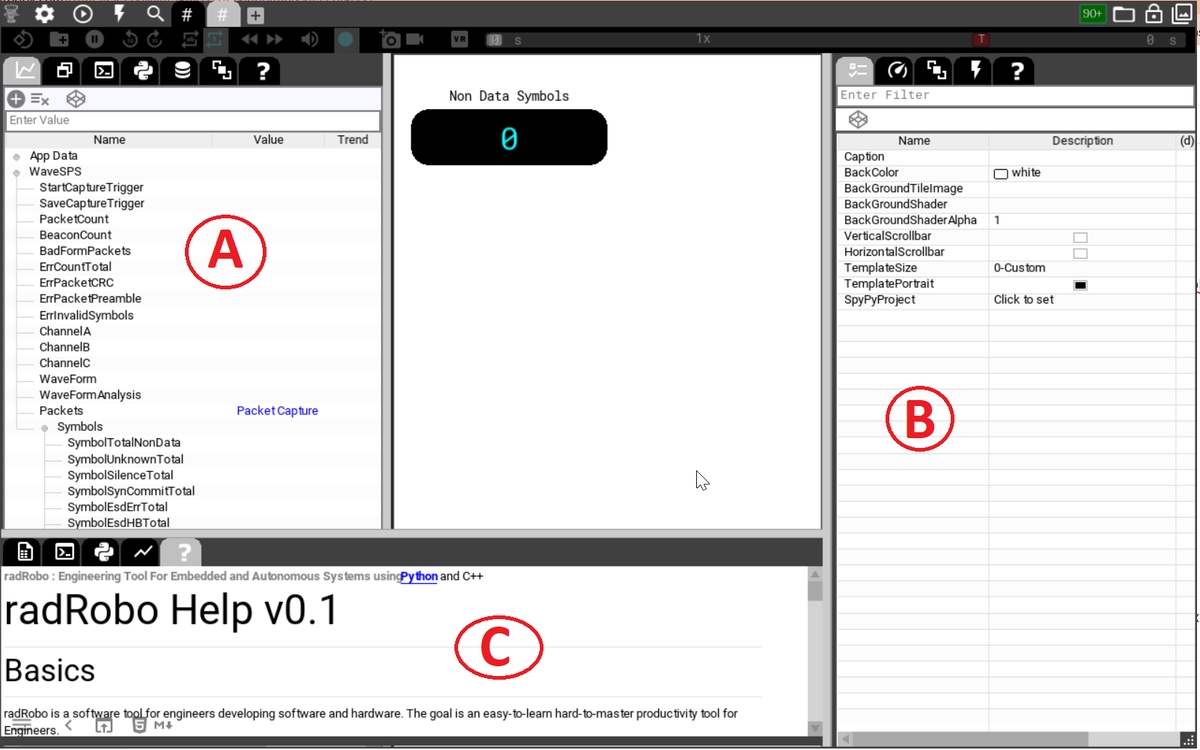
The GUI of RADRobo has a main panel where GUI controls are located and then 3 tabbed pull out areas (A, B, C). The left tab (A) contains the data explorer - this lists the data available to your panels. The right tab (B) is the properties window - this allows you to set properties of anything you select in RADRobo - mainly panel controls or data sources in data explorer. All tabs can show the integrated help (A, B, C).