WaveSPS
WaveSPS plug in for RADRobo
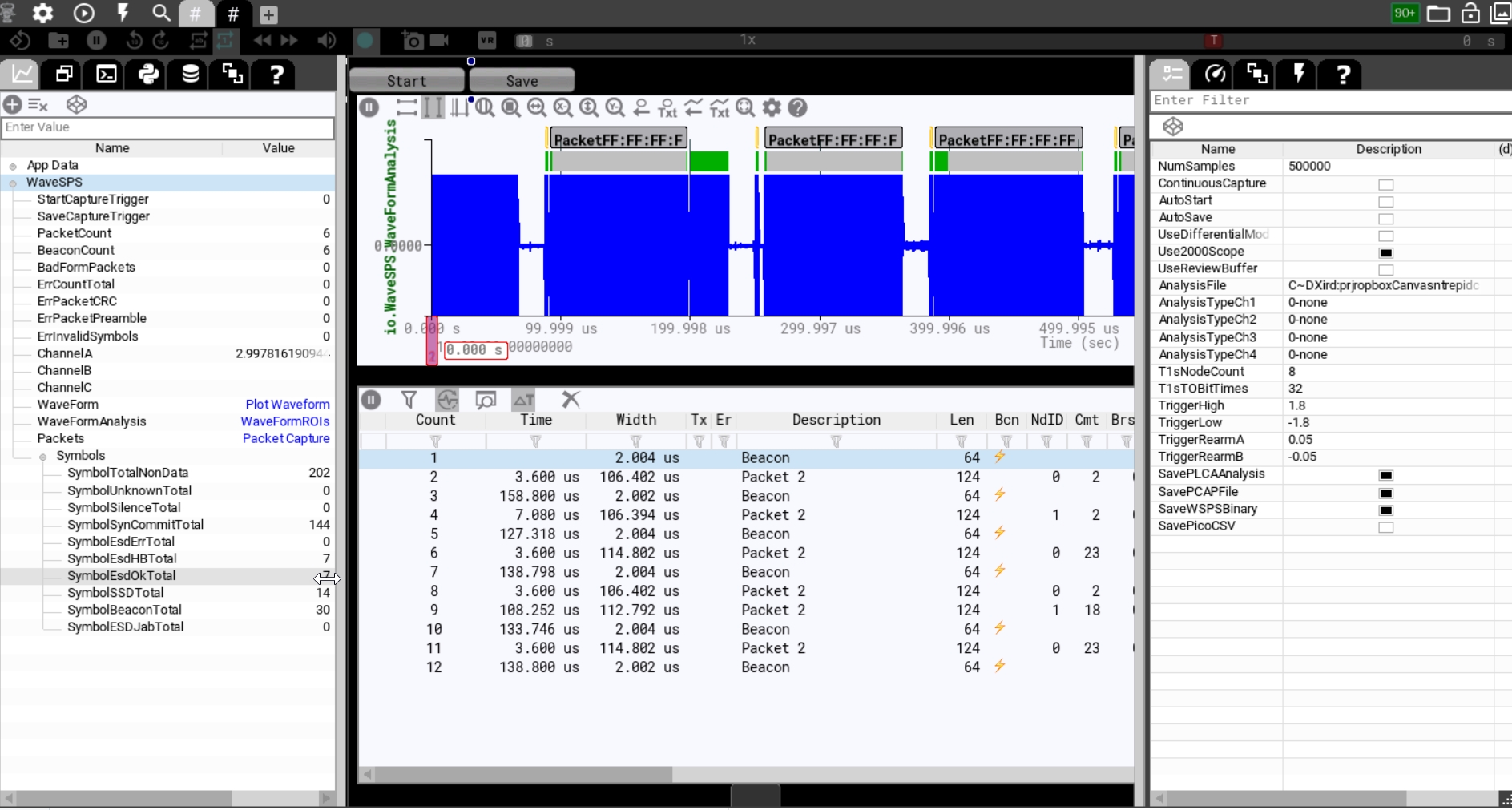
The WaveSPS plug in captures analog data and processes to extract packet data. It provides this data via packets, waveform data, and an annotated times series.
It also captures statistics on the capture and provides settings to RADRobo to setup the capture and analysis.
WaveSPS Data Items Captured
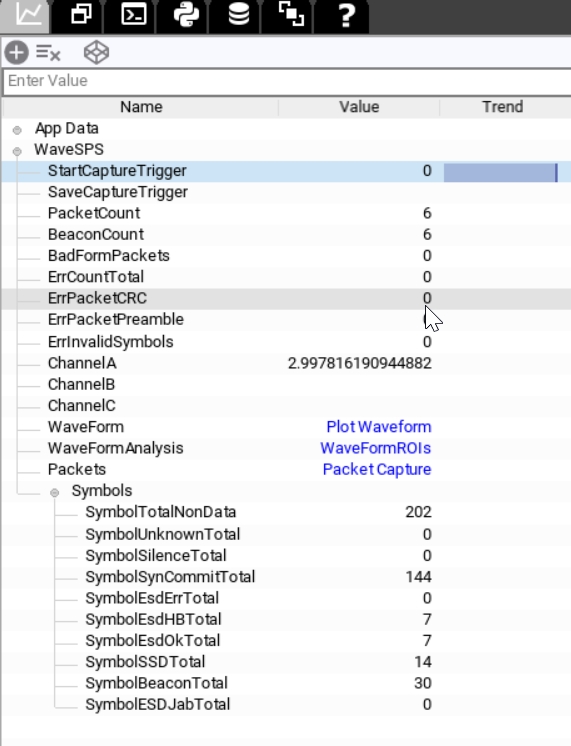
The above captured items are values that can be used on the panels or in scripts.
| Data Item Name | Description | Notes |
|---|---|---|
| StartCaptureTrigger | used to start a capture when autocapture and Continuous capture is off | Set to one to start capture. Use with button or script. |
| SaveCaptureTrigger | used to save data from a capture when Autosave is off | Set to one to save captured data to enabled file formats. |
| PacketCount | number of packets captured (full Ethernet frames) | |
| BeaconCount | The number of T1s PLCA beacons captured | A beacon in this context means the logical beacon formed by five 5B beacon symbols. |
| BadFormPackets | This is a packet that does not have at least 2 commits | |
| ErrCountTotal | This is total errors across capture | |
| ErrPacketCRC | A count of packets that had incorrect CRCs | |
| ErrPacketPreamble | count of packets that did not have a correct preamble sequence (0x55, SFD) | |
| ErrInvalidSymbols | count of 5B symbols are not a valid 5B symbol | |
| Channel A-C | Last captured value of channel | |
| WaveForm | Waveform of capture data | Use in plot control in panel |
| WaveFormAnalysis | Waveform of annotations | Use in plot control in panel |
| Packets | list of captured packets | Use in packet history control |
| Symbols Tree | A count of each type of 5B Symbol |
WaveSPS Properties
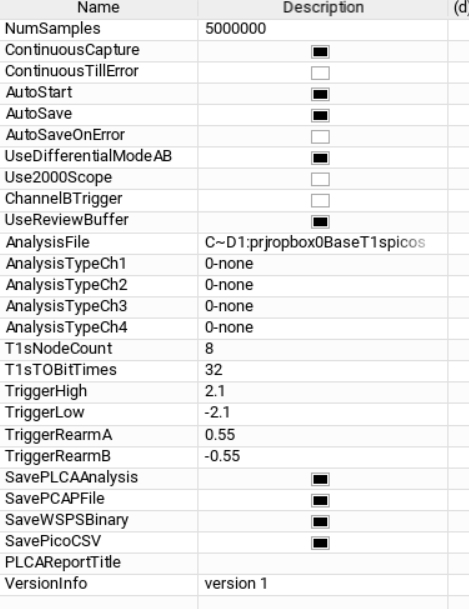
Using properties you can control how WaveSPS captures data. When you click on the root node "wavesps" in the data view you can edit these properties. These properties are saved in the setup file.
| Property Name | Description | Notes |
|---|---|---|
| NumSamples | The number of samples to capture | This is 32 Mega samples for Picocope 2206B MSO. This is 512 Mega samples for Picoscope 3406D MSO. This is shared if more than one channel is captured (like differential mode A-B). |
| ContinuousCapture | After a capture occurs another one starts immediately | |
| ContinuousTillError | After any error occurs continuous Capture will stop | Can be restarted by restarting or setting StartCaptureTrigger to 1 |
| AutoStart | Starts when RADRobo goes online | |
| AutoSave | Auto save all enabled file formats after capture | Disable this to selectively save with a panel button or script |
| AutoSaveOnError | Auto save all enabled file formats when any error occurs | |
| UseDifferentialMode | Captures on both A and B channels and does a math channel difference. | |
| Use2000Scope | Selects support for the Picoscope 2206B. when unchecked it uses Picoscope 3406D. | |
| UseChannelBTrigger | If enabled, this will setup a falling edge 1V trigger of Channel B of the picoscope | This trigger is compatible with the RADMeteor trigger output. |
| UseReviewBuffer | If checked it loads the previously saved file in the "AnalysisFile" property. | This can be a previously captured WaveSPS binary. |
| AnalysisTypeCh1(2,3,4) | This feature is not supported. Only T1s decoding is enabled on Channel 1. | |
| T1sNodeCount | The T1s PLCA node count configuration | This value is used to calculate the PLCA analysis report and used TOs for beacons. |
| T1sTOBitTimes | This is the T1s PLCA size of transmit opportunity in bit times. | This is used to calculate the source Node Id of a frame |
| TriggerHigh | The high level transition for DME encoding used in T1s in volts | |
| TriggerLow | The low level transition for DME encoding used in T1s in volts | |
| TriggerRearmA | The amount of volts the waveform must transition to rearm rising trigger | |
| TriggerRearmB | The amount of volts the waveform must transition to rearm falling trigger | |
| SavePLCAAnalysis | The will save the plca analysis report | |
| SavePCAPFile | This will save a PCAP file | Use with Wireshark or Vehicle Spy |
| SaveWaveBPSBinary | This will save a file with waveform data | This can be open and used as a data source to review old captures |
| SavePicoCSV | Not supported. | |
| PLCAReportTitle | Text that will go into the PLCA analysis report to identify it | |
| Version | Version of the WaveSPS plug in |
WaveSPS Packet List Column Notes
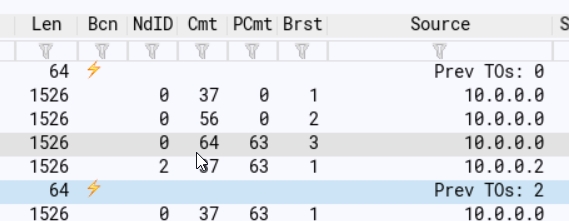
If you click on a Packet it will zoom the plot time if connected. Also if you click on the plot it will locate the bus event in the packet list. The table below lists the non-obvious columns.
| Column Name | Description | Notes |
|---|---|---|
| Er | Any errors associated with the packet | |
| Bcn | This is a beacon symbol | |
| NdID | The node ID that sourced this packet | |
| Cmt | The number of commit symbols used for this packet | |
| Brst | The index of the burst packet with this message | |
| PCmt | The number of commits that occur after a packet when burst mode is enabled |